
MX Master 3S
High-precision wireless mouse for productivity workflows
A full-size productivity mouse in Logitech's MX family, positioned for heavy desktop users who want high precision and customisability. Suits creators and office professionals who switch between multiple devices and large/hi‑DPI displays.
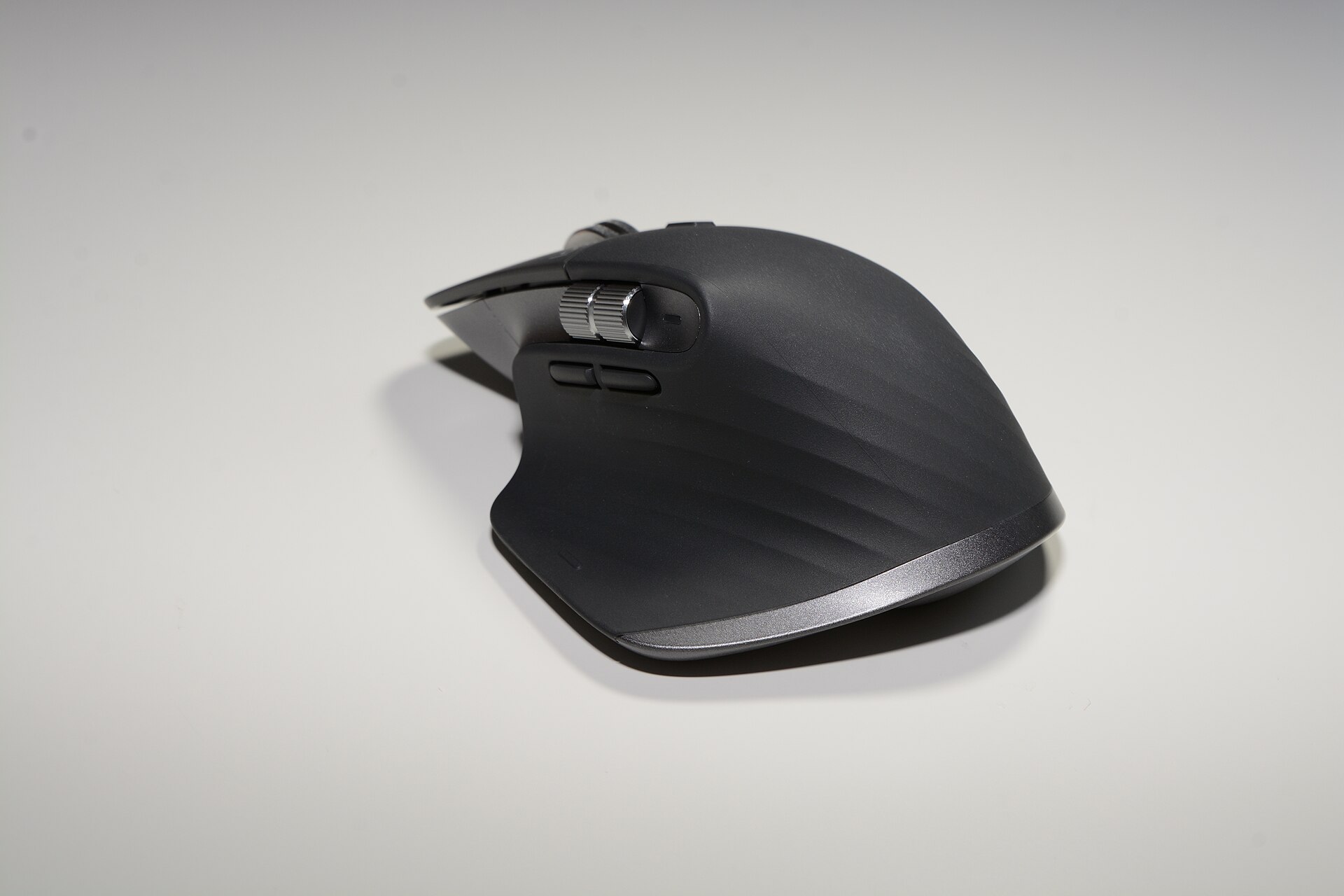
Photo: Hayden Schiff via Wikimedia Commons, licensed under CC BY 4.0.
For heavy desktop users who want a comfortable, programmable wireless mouse with quiet clicks; its proprietary software and rechargeable battery are the main trade-offs.
01 / 05Who this suits and who it does not
The MX Master 3S is aimed squarely at desktop power users: people who spend long hours working with documents, spreadsheets, creative apps and multiple monitors. Its sculpted right‑hand shape, large thumb rest and abundant programmable controls make it easier to map repetitive tasks and move between machines with Easy‑Switch or Logitech Flow. Logitech’s own specs emphasise the 8,000 DPI sensor, Bluetooth and Logi Bolt connectivity, and a rechargeable battery rated up to 70 days — features that underline the focus on sustained, deskbound productivity. logitech.com
If you use a laptop on the go, prefer ambidextrous mice, or need a very light gaming mouse, the MX Master 3S is not ideal. It’s a relatively heavy, right‑handed design and not tuned for the low‑latency micro‑adjustments competitive gamers expect. Reviewers such as Tom’s Hardware and RTINGS note the MX Master line’s strengths for office and creative workflows rather than esports. tomshardware.com
It also relies on Logi Options+ for per‑app button mapping and Flow multidevice features — useful if you value deep customisation, frustrating if you prefer plug‑and‑play without vendor software. Ars Technica and other reviewers point out that the software adds capability but is required to access many of the mouse’s conveniences. arstechnica.com
02 / 05What the money buys compared with alternatives
At the list price of USD 89.99, the MX Master 3S sits in the premium productivity mouse bracket. For that money you get a high‑precision 8,000 DPI optical sensor, a full complement of programmable buttons including a multi‑mode MagSpeed scroll wheel and a metal thumb wheel, Logi Bolt compatibility for business deployments and a USB‑C rechargeable battery. Logitech’s product pages and spec sheets list these as the headline features and show the MX Master 3S as an incremental update over the MX Master 3. logitech.com
Alternatives at the same price range include Logitech’s own MX Master 3 (often discounted) and newer MX Master 4 in some markets — the 3S trades little in ergonomics for quieter switches and a faster sensor. Competing options from Microsoft’s Surface Precision and some premium models from Razer or Corsair target either better cross‑platform integration or gaming performance; they won’t match the MX Master ecosystem for workstation features like Flow and deep per‑app mapping. TechRadar and Tom’s Hardware highlight that the 3S is best for users who prioritise comfort and workflow over gaming specs. techradar.com
In short, you’re paying for ergonomics, customisability and battery convenience rather than novel hardware advances — which suits office and creative users more than competitive gamers or travellers. Reviewers commonly recommend hunting for discounts on the earlier MX Master 3 if the quieter clicks or slightly higher DPI aren’t essential to you. global.techradar.com
03 / 05Where it is weakest
The MX Master 3S’s principal weaknesses are its bulk, software dependence and the inevitability of an internal, non‑user‑replaceable battery. At about 141 g and a distinctly right‑handed profile, it isn’t suitable for users who prefer lightweight or ambidextrous mice. Multiple reviewers and longform spec sheets call out the chair‑bound ergonomics as a strength — but that same design is a liability if you need portability. origin2.logitech.com
Logi Options+ unlocks much of the mouse’s value, but that means many of the advanced features are software‑tied. Ars Technica and Tom’s Guide note that while the software is powerful, it adds a layer of dependency and occasional friction for people who want immediate functionality without vendor apps. For IT environments, Logi Bolt and business variants ease deployment, but consumer users may find the app ecosystem intrusive. arstechnica.com
Finally, the rechargeable battery brings convenience but raises longer‑term considerations: the pack isn’t user‑replaceable, so battery ageing or failures will eventually affect lifespan. Community threads report mixed long‑term experiences, and while Logitech’s guidance gives typical durations (up to 70 days), real‑world battery behaviour will vary with use patterns. origin2.logitech.com
04 / 05Cost to actually use (lenses, cards, batteries equivalent)
Unlike cameras, the MX Master 3S’s ongoing costs are modest but worth listing. The mouse includes a built‑in rechargeable Li‑Po battery and USB‑C charging, so you won’t need disposable batteries — Logitech advertises up to 70 days per charge and a quick‑charge capability that gives hours of use from a minute of charging. That removes recurring battery expense, but you should expect to replace the mouse when the internal battery degrades after several years, which is an eventual ownership cost to factor in. logitech.com
Accessories that matter are a spare Logi Bolt USB receiver only if you want a dedicated dongle for another PC (Logi sells Bolt receivers separately) and possibly a small desk pad for consistent tracking; the MX Master 3S’s Darkfield/optical tracking works well on most surfaces and does not require special mats. If you rely on multi‑computer Flow, you may want to budget for a second receiver or keep Bluetooth availability in mind. logitech.com
In practice the total cost of ownership beyond the purchase price is low: occasional cables (USB‑C) and eventual replacement after battery ageing. That makes the MX Master 3S cheaper to run than some peripherals that require disposable batteries or frequent firmware‑locked accessories. Reviewers have not flagged significant hidden costs beyond software and eventual battery replacement. tomshardware.com
05 / 05Closing verdict
The Logitech MX Master 3S refines a winning formula: it keeps the MX Master family’s comfortable, programmable ergonomics and adds quieter switches and an 8k optical sensor. For desktop professionals and creative users who prioritise comfort, per‑app customisation and cross‑computer workflows, it is an easy recommendation. Independent reviewers from Ars Technica and Tom’s Hardware describe it as a small but sensible step forward that preserves what made the MX Master 3 successful. arstechnica.com
If you need a lightweight, ambidextrous or gaming‑oriented device, or you dislike vendor software controlling advanced features, look elsewhere. The MX Master 3S’s strengths are specific: sustained comfort, programmeable controls and desktop productivity. Its weaknesses — weight, software dependence and a sealed rechargeable battery — are real but acceptable for its target users. TechRadar and RTINGS reach similar conclusions: excellent for productivity, less appealing for other niches. techradar.com
At USD 89.99 list price, it offers strong ergonomics and workflow gains for the money; if those are what you value, it’s a practical buy. If you want the same ergonomics cheaper, hunt for MX Master 3 discounts; if you want gaming latency or travel portability, consider competing options. Overall, the MX Master 3S remains a clear choice for long‑hour desktop users who accept the software and battery trade‑offs. logitech.com
The honest summary
After every long-form review, we publish the two-sided summary. What proved durable, and what failed during testing.
What held up
4 items- +Ergonomic sculpted shape with large thumb rest for long sessions
- +8,000 DPI optical sensor with reliable tracking on most surfaces
- +Many programmable buttons and per‑app mapping via Logi Options+
- +Quiet Click switches and long USB‑C rechargeable battery (up to 70 days)
What broke
4 items- −Right‑handed and relatively heavy — not suitable for travel or ambidextrous users
- −Advanced features rely on Logi Options+ software
- −Internal, non‑user‑replaceable battery will age over years
- −Not optimised for low‑latency gaming compared with dedicated gaming mice
What it actually costs
Manufacturer list prices. Retailers discount constantly, so treat these as the figure to judge an offer against rather than what you should pay.
List price
Manufacturer recommended price — retailers vary and discount often.
What to check before buying MX Master 3S
Hardware is bought once and lived with for years. The purchase price is the part everyone compares, and rarely the part that decides what it costs you.
What it has actually sold for
The manufacturer lists it at $89.99, and on hardware that figure moves constantly at retail. Treat it as the figure to judge an offer against, not what you should expect to pay.
Where it sits in the release cycle
A model about to be replaced is discounted for a reason, and one just launched carries a premium that fades within months. Knowing which you are looking at is worth more than any coupon.
What it needs that it does not come with
Cases, cards, cables, batteries, lenses, mounts, subscriptions. In some categories the accessories cost more across two years than the item did, and none of it is on the price tag.
Returns, warranty, and who honours it
The return window, the warranty length, and whether the manufacturer or the seller handles a fault. A grey-market price often buys a warranty that is harder to claim against.
These are the checks we apply across peripherals, in the same order, so two pages can be compared line for line.
How much does MX Master 3S really cost?
Our calculation from the vendor's published prices — not a figure the vendor advertises.
No paid plan with a published price.
- Pricing model not yet verified.
- No paid plan price is published on this page.
- Pricing has not been verified against the vendor's page since this data was collected.
Work out your own cost
MX Master 3S against the field
The highest-scoring alternatives in the same category, compared on the figures we hold for all of them.
| MX Master 3SThis page | Yeti X — Professional USB Microphone | TS3 Plus - Thunderbolt Station 3 Plus | |
|---|---|---|---|
| ReviewCost score | — | — | — |
| Cheapest plan | List price | — | — |
| From | — | — | — |
| Renews at | Not published | Not published | Not published |
| Biggest strength | Multi-device workflows | Live streaming and gamecasting | Thunderbolt 3 laptop users needing many desktop ports |
| Biggest drawback | Right-handed, full-size ergonomic shape | USB-only — no native XLR output | Requires Thunderbolt 3 host (not USB-C only) |
Prices are the published figures at the time of writing and change often. Renewal pricing is shown where the vendor publishes it. See how we review.
What people ask about MX Master 3S
Straight answers to what buyers actually ask, drawn from the documentation and published user reports.
Does the MX Master 3S work without Logitech software?
Page history
- Published
- 2 October 2026
- Last updated
- 2 October 2026
Pricing on this page has not yet been checked against the vendor’s own page.
Sources & verification
Pricing on this page has not been checked against the vendor's page recently.
- MX Master 3s Wireless Mouse - 8K Optical Sensor | LogitechOfficial documentation · Logitech · read 2 October 2026
- MX Master 3S For Mac | LogitechOfficial documentation · Logitech · read 2 October 2026